NameBright
  • Customer Guides
  • Knowledgebase
  • FAQs
  • Contact Support
My Account

Customer Guides

Category Management

Create categories, move domains into them, and apply shared settings to a whole category at once.

  1. Help Center/
  2. Customer Guides/
  3. Category Management/
  4. Create a Category

Category Management

  • Create a Category
  • Move Domains into a Category
  • Apply Shared Settings to a Whole Category
  • View Category History

Create a Category

GUIDE-10.1 · 1 min · Updated September 2026

Every account starts with one default category. Create additional ones to organize domains by client, project, TLD, or however your portfolio is structured.

  1. Log in to your NameBright account.

  2. Go to My Categories .

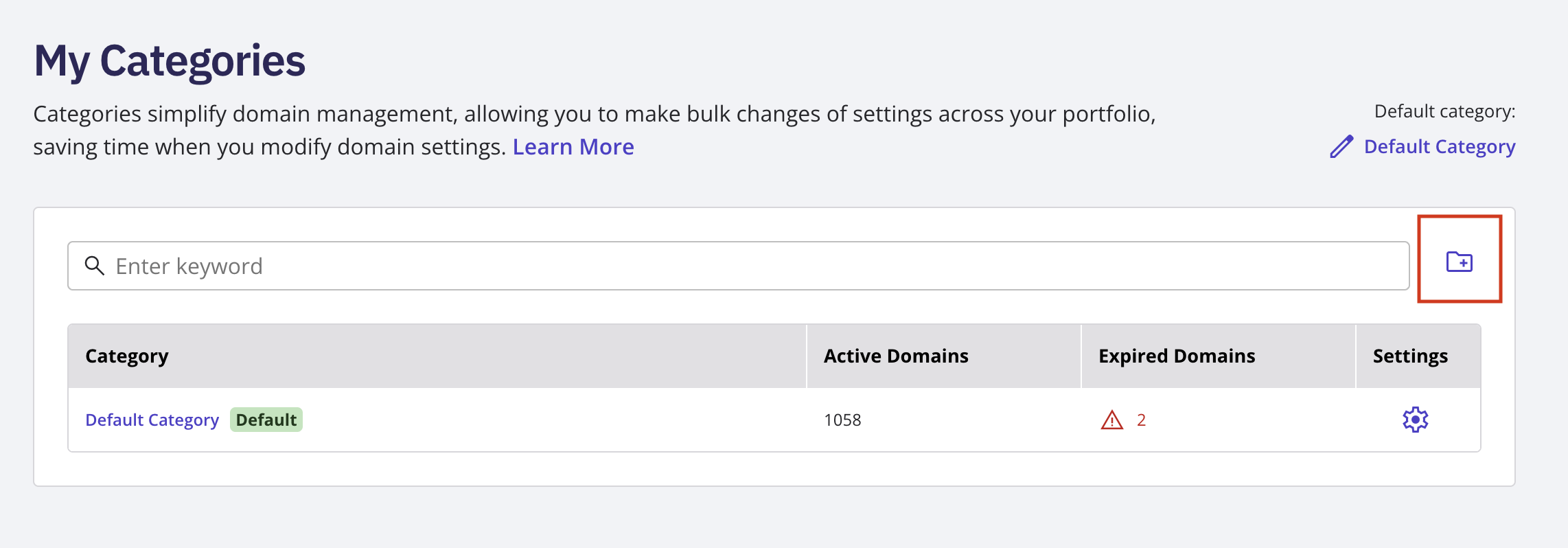
  3. Select \+ New Category .

  4. Name it and save.

My Categories page with the \+ New Category button and the naming field open

Related

  • Move Domains into a Category →
  • Apply Shared Settings to a Whole Category →
  • What Is a Domain Category and Why Group Domains at All? →

Still need help?

Real people, real answers

Our support team is available Mon–Fri, 8am–5pm Mountain Time. For urgent issues outside business hours, submit a ticket and we'll respond first thing.

Contact Support

Help Center

  • Customer Guides
  • Knowledgebase
  • FAQs
  • Contact Support
  • System Status

NameBright

  • Domain Search
  • Transfer a Domain
  • TLD Pricing
  • Domain Auctions
  • API Access

Company

  • About Us
  • Trust & Security
  • Industry Engagement

Legal

  • Privacy Policy
  • Terms & Conditions
  • Dispute Policy
  • RDAP Terms

Account

  • Create Account
  • Log In
NameBright

NameBright is an ICANN-accredited domain name registrar.

For questions or concerns email abuse@namebright.com © 2026 NameBright.com. All Rights Reserved.